
Electronic devices are expensive, but they hold more than just financial value. Your computer may store your critical work files, cherished family photos, or important school projects. That’s why climate-controlled storage for electronics is so important. Having to replace these items can be frustrating and expensive.
That’s why climate-controlled storage is a must when you’re storing electronics that are susceptible to fluctuating temperatures and humidity. Without climate protection, you risk irreversible damage or loss to not only your devices but the information they hold.
If you’re looking for climate-controlled storage in Texas, you can trust Summerhill Storage in Texarkana. Climate-controlled self storage is essential to protect delicate electronics from extreme temperatures and humidity. We offer a wide selection of sizes to fit your needs and your budget. Give us a call for more information. Your peace of mind is our priority.
Choosing the Right Type of Self Storage for Electronic Devices
Climate Control Isn’t Optional
Electronics are sensitive to temperature changes. Extreme heat can affect plastic casings, internal wiring, batteries, screens, and circuit boards. In the Texas heat, that risk becomes even more important because outdoor temperatures can climb quickly and stay high long enough to cause extensive damage.
Humidity is another major concern. Moisture in the air can cause corrosion, especially on circuit boards, connectors, and ports. Even if your device looks fine from the outside, humidity damage can slowly build up inside. You won’t know there’s a problem until you try to plug it in.
That’s why climate-controlled storage is the best choice for electronics. A climate-controlled unit helps reduce exposure to extreme temperatures and high humidity.
Updated Security is a Must
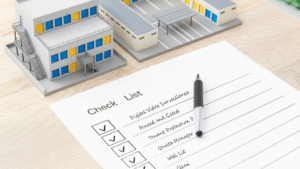
Electronics are valuable. With 24-hour video surveillance, electronic gates, bright lighting and a professional onsite manager, we protect your belongings as if they are our own.
Check Unit Sizes and Configurations
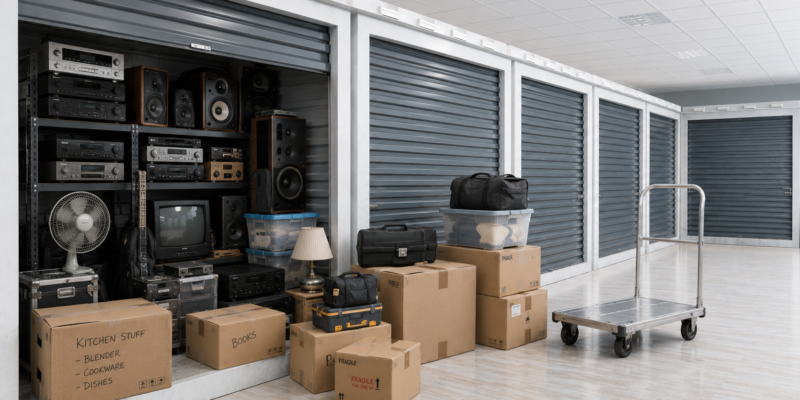
Unit size matters, too. Don’t squeeze electronics into a unit so tightly that screens, boxes, or components are pressed against heavier items. Give yourself enough space to stack containers carefully, keeping certain devices upright and leaving room for airflow.
Insurance
Inquire about insurance options for your stored items. While you may have homeowner’s or renter’s insurance, it may not include off-premises coverage. Storage insurance will give you additional peace of mind in case of unforeseen circumstances.
How to Prepare Electronic Devices for Self Storage
Backup Your Data
Before placing electronics in storage, start by backing up your data. This is one of the most important steps you can take. Save important files, photos, videos, documents, and settings to a cloud service or external drive.
Clean Your Equipment
Dust and dirt can settle into vents, ports, keyboards, and fans. Use a soft microfiber cloth to wipe down surfaces. For keyboards, vents, and camera gear, use gentle cleaning tools designed for electronics. Avoid harsh cleaning products or too much liquid, because moisture can create damage.
Remove Batteries
Remove batteries from remotes, cameras, wireless keyboards, flashlights, and other battery-powered items. Batteries can leak in the heat, causing irreversible damage. For rechargeable items, follow the manufacturer’s storage recommendations.
Secure removable parts.
SIM cards or external hard drives should be stored separately in bags or containers. Take out discs from gaming consoles, DVD players, and computers. Remove memory cards from cameras. Detach accessories that could bend, snap, or place pressure on the device. Protect screens with soft covers, foam, or screen-safe padding. Store TVs and monitors upright instead of laying them flat, to prevent stress on the screen.
Organize your accessories
Organization makes a big difference. Take a photo so that you remember how to reconnect your devices, and then remove cables, chargers, remotes, adapters, and accessories. Label them clearly to save you from guessing later. You can also place cables in clear bags and tape the bag to the outside of the device’s box.
Protect screens and delicate components.
Use screen protectors or covers to safeguard the screens of your smartphones, tablets, or laptops. Additionally, use protective cases or sleeves to minimize the risk of scratches or dents. Use appropriate covers for delicate components, such as camera lenses or gaming console controllers.
Pack Carefully
Use original packaging that is designed to support the device properly, especially for TVs, monitors, speakers, cameras, and gaming consoles. If you don’t have the original box, choose a sturdy box with plenty of padding. Use anti-static bags for sensitive electronics.
Create an Inventory
Write down what you’re storing, including brand names, model numbers, serial numbers, and estimated value. Taking photos of each item before packing helps with organization and insurance claims.
Maintenance and Monitoring of Stored Devices
Check Your Stored Devices Regularly
Once your electronics are in storage, don’t forget about them completely. If you plan to store devices for several months or longer, inspect them regularly. Check boxes for moisture, dust, pests, or signs of damage. Make sure nothing has shifted or is leaning against screens or delicate components.
Update your devices
Regularly power up your electronic devices and update their software. This will ensure that any bug fixes are installed and that everything is kept in good working order. Check the manufacturer’s information and perform diagnostic tests and recommended maintenance tasks.
Rotate Devices Periodically
If you’re storing multiple electronic devices, consider rotating them periodically. Regularly swap devices between storage and active use. Using stored devices occasionally can help prevent deterioration and maintain their functionality.
Keep a record of manufacturer information
Have manufacturer information and warranty details for each electronic device easily accessible. This will be useful if you need to contact customer support or make a claim. Store this information in a safe place away from your storage unit.
Conclusion
A little preparation goes a long way. Electronics need more than a cardboard box and a locked door, especially in the Texas heat. High temperatures, humidity, and dust can damage valuable devices before you even realize there is a problem.
If you’re storing TVs, computers, gaming consoles, and other electronic devices, Summerhill Storage can help you find the right storage option for your needs. Contact us today to ask about climate-controlled units and choose a space that helps protect the items you count on.